
• Please use real names.

    Greetings to all who have registered to OPF and those guests taking a look around. Please use real names. Registrations with fictitious names will not be processed. REAL NAMES ONLY will be processed

    Firstname Lastname

    Register

    We are a courteous and supportive community. No need to hide behind an alia. If you have a genuine need for privacy/secrecy then let me know!
  • Welcome to the new site. Here's a thread about the update where you can post your feedback, ask questions or spot those nasty bugs!

In Perspective, Fun: More Black and White Experimentation

Bobby Deal

New member
Os this is just a random portrait from an old shoot that I have not gotten around to since I shot the girl.

I selected the girl randomly because I was playing with some new actions a buddy had written just seeing what they were.

So I started out not expecting to end with anything I would save but I was surprised by this last one. Sadly I ran it through 3 or 4 different actions to get here but I really kind of liked the finished skin tone of it.

I started with a Dragonizer which was a much more extensive process of masking, burning and dodging then I would have expected from an action and in the end actually grunged it up pretty bad (in a good way but it would have worked better starting with a B&W image to begin with I think.

So then I ran it through an alabaster portrait action which left here really washed out so I played with a couple adjustment layers and added a layer with warming filter then run her through a Tromp l'oeil which left her beautiful but a grainy as old some ASA 1000so I run my normal high pass skin smooth work flow, added a levels adjustment layer, tweaked the blacks a little in selective color, a bit of cloning to clean up some stray hairs and a couple of blemishes and some selective dodge and burn and here you have an image that should have been destined for the bin.
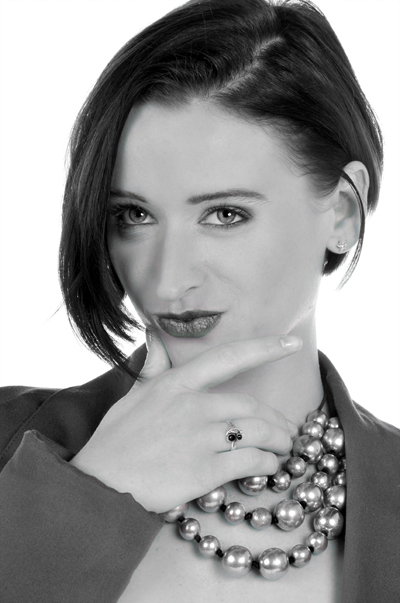
651267691_DgSPP-X3.jpg
 

Asher Kelman

OPF Owner/Editor-in-Chief
So then I ran it through an alabaster portrait action which left here really washed out so I played with a couple adjustment layers and added a layer with warming filter then run her through a Tromp l'oeil which left her beautiful but a grainy as old some ASA 1000so I run my normal high pass skin smooth work flow, added a levels adjustment layer, tweaked the blacks a little in selective color, a bit of cloning to clean up some stray hairs and a couple of blemishes and some selective dodge and burn and here you have an image that should have been destined for the bin.

Bobby,

So did you run the high pass smooth skin workflow on top of the alabaster look or started afresh? In any case, this only underlines for me love of the work after the picture is taken. It can be very satisfying when things go so well, as in this case. Now to get this into a workflow from the outset! That would be great.


651267691_DgSPP-X3.jpg


Bobby Deal Untitled Portrait


Asher
 

Bobby Deal

New member
No all this was piled on one after the other and in all honesty it should have created a grainy noisey image with as much adjusting as went on.

I ran the skin smoothing workflow after the Tromp l'oeil action which left her with a heavy film style grain.

Thankfully abot 80% of the adjustments here were done by action so this actually could become part of a regular workflow if you had to do all the work that the actions did by hand this would have been about a 3 hour conversion instead of a 15 minute one.
 

Asher Kelman

OPF Owner/Editor-in-Chief
No all this was piled on one after the other and in all honesty it should have created a grainy noisey image with as much adjusting as went on.

I ran the skin smoothing workflow after the Tromp l'oeil action which left her with a heavy film style grain.
Everything you described was sequentially on one file? I hope it was done in 16 BIT? Maybe you could look at the steps and see if some steps are redundant.

Are these actions commercial or your own? If you can't shorten it, then it would take weeks to complete!

Asher
 

Bobby Deal

New member
Yup, all on one file and on a 72 dpi 8 bit version to boot. I am not positive I listed the whole sequence because as I said I was just playing around with this pile of actions that were given to me. Most of these actions have been recorded by my friend and or his geek buddies who like to tweak existing tutorials and see what they can make different out of them. I have no doubt that there was a toin of redundancy in the flow of this and am doubtful that I could actully recreate these results 100% As Bob Ross would have said, this was just a happy accident.
 

Asher Kelman

OPF Owner/Editor-in-Chief
Bobby,

I have the same self-criticism. Sometimes I just want to see what resilience and possibility is in a file. It's late, so I choose the jpg. first error. Anyway, 3 hours later, magnificence! However, I didn't have the history or label each layer. Why do we do that?

Asher
 

Mike Shimwell

New member
Bobby,

I have the same self-criticism. Sometimes I just want to see what resilience and possibility is in a file. It's late, so I choose the jpg. first error. Anyway, 3 hours later, magnificence! However, I didn't have the history or label each layer. Why do we do that?

Asher

Ah yes, play with a nice little 750 pixel wide jpg in srgb so you can forget the steps needed when you go back to the 20+ Mpx 16 bit tiff in DCam3...:) I've done that too, but it's good for freeing play - you have less boundaries when you're not afraid of messing it up.

Looking at this picture, if I'm honest porcelain skin isn't really my thing, but you've got back to a nice place. Very much the movie star.

Mike
 
Top